Skip to content
Watt Warden

Power Stations

Portable Power Station vs UPS: Which Do You Need?

They look like the same product — a battery with outlets — and they are designed for opposite jobs. One buys you seconds of continuity, the other buys you hours of power.

By Sawyer V.Updated Published How we work this out
A desk with a router, modem and network cables.

Watt & Warden earns a commission on qualifying purchases made through links on this page, at no extra cost to you. It never changes a ranking, and our picks include products we tell you to skip. Full disclosure.

Quick picks

#ProductBest forPrice
1
No photo

The UPS case

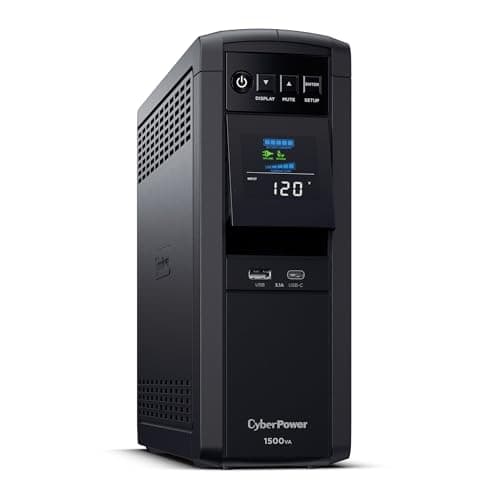
CyberPower CP1500PFCLCD

1,500VA of pure sine backup with voltage regulation — about 10 minutes at half load, which is the point.

A desktop, a NAS, a network rack
2
No photo

The station that does both

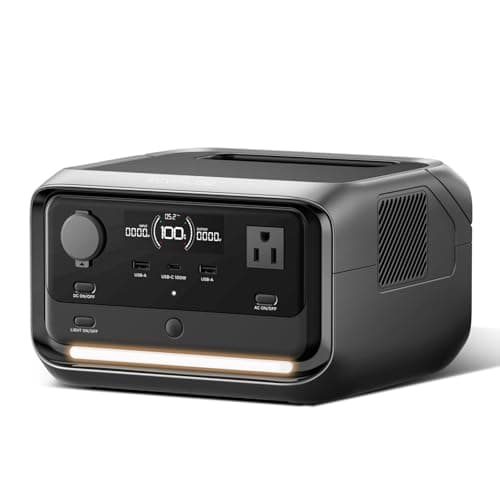
EcoFlow RIVER 3 Plus

286Wh with sub-10ms switchover — UPS behavior with hours of runtime behind it.

Anyone who wants continuity and runtime
3
No photo

The cheap correct answer

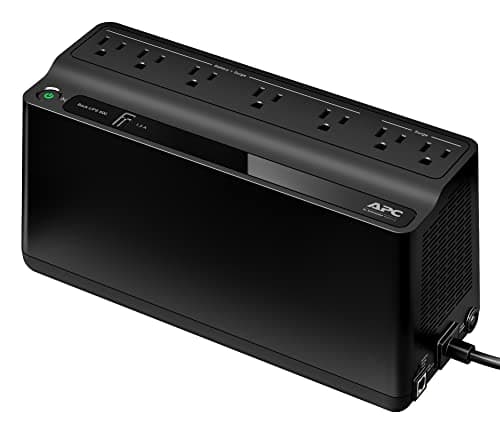
APC Back-UPS BE600M1

600VA, about 23 minutes at 100W, at a fraction of either alternative.

Only the modem and router

Prices come from the retailer at page-build time and change constantly. Where no live price is available the button reads “Check price” rather than showing a number we cannot stand behind.

What each one is actually for

A UPS — uninterruptible power supply — exists to make an outage invisible to equipment that cannot tolerate one. It sits between the wall and the device, passes utility power through, and switches to battery in single-digit milliseconds when the grid fails. Its runtime is deliberately short, typically five to twenty minutes, because its job is to keep things alive until either the power returns or you shut down cleanly.

A portable power station exists to supply power where there is none, for hours. It holds ten to a hundred times the energy of a comparable UPS, it is portable, it charges from solar, and — in its basic form — it does not switch over at all: you plug things into it when you want power from it.

The mistake that costs people money runs in both directions. Buying a UPS to get through a four-hour outage produces twenty minutes and disappointment. Buying a 2kWh station to protect a desktop from a two-second flicker is spending ten times what the job requires, unless the station has UPS-grade switchover.

The specification that separates them

Switchover time, measured in milliseconds. It is how long the output is dead while the device transfers from grid to battery.

  • Under 10ms — nothing notices. Desktops, network equipment, and anything with a switching power supply ride straight through.
  • 10–20ms — most equipment is fine. A power supply typically holds up for one AC cycle, roughly 16ms at 60Hz.
  • 20–50ms — sensitive equipment may reboot.
  • No switchover — the device is not in the circuit at all until you plug into it. Most basic power stations.

APC publishes 6–10ms for the BE600M1. EcoFlow publishes under 10ms for the RIVER 3 Plus, and Jackery publishes 20ms for the Explorer 2000 v2. The interesting fact is that the second two are power stations — the categories have converged from the station side, and a modern station with UPS mode genuinely does both jobs.

Side by side

PropertyUPSPower station
Typical energyMinutes at a partial loadHours at a full load
SwitchoverAlways, 4–10 msOnly on UPS-capable models
PortableNo, in practiceYes
Solar chargingNoYes
Voltage regulationUsually, via AVRRarely
Runs a fridgeNoYes, above 1,800 W inverter
Battery life3–5 years, then replace3,000–6,000 cycles, LiFePO4

Figures from APC, CyberPower, EcoFlow and Jackery published specifications, linked below.

The one thing a UPS does that a station usually does not

Automatic voltage regulation. A UPS with AVR corrects sags and swells in the incoming supply without switching to battery at all — it boosts a brownout back to normal and trims an overvoltage down. In an area with a weak or noisy supply, that is a genuine benefit that happens constantly rather than only during an outage, and it extends the life of the equipment behind it.

Most power stations do not do this. They either pass power through untouched or they switch to battery. If your problem is dirty power rather than absent power, that difference is the deciding one.

The honest recommendation

Buy a UPS if the requirement is protecting specific equipment from a short interruption — a desktop, a NAS, a network rack, a sump pump controller that must not lose its state — and you accept that an extended outage means shutting down.

Buy a power station if the requirement is having power for hours: keeping a fridge cold, running lights, charging things, or having power somewhere there is no outlet. Choose one with UPS mode and you cover both requirements with one device.

Buy both if you have equipment that genuinely cannot blink and outages that genuinely last. A small UPS on the sensitive equipment and a station for everything else is cheaper than one device that does both well, and it fails more gracefully.

For the specific and very common case of keeping the internet alive, the router and modem page works through the options at every budget.

The picks in full

01The UPS case

CyberPower CP1500PFCLCD

1,500VA of pure sine backup with voltage regulation — about 10 minutes at half load, which is the point.

A UPS is designed around one job: bridge the gap so nothing crashes. The CP1500PFCLCD does it well — pure sine output that active-PFC power supplies accept, automatic voltage regulation that corrects minor sags without touching the battery, and twelve outlets split between battery-backed and surge-only.

The published runtime tells you everything about its intent: about ten minutes at half load, two and a half at full. That is enough to save work and shut down cleanly, and it is not meant to be enough for anything else.

Skip it ifyou want to power anything through an actual outage. Ten minutes is a graceful shutdown, not a backup plan.

Published specifications for the CyberPower CP1500PFCLCD
SpecificationPublished figure
Capacity1,500 VA / 1,000 W
WaveformPure sine wave (PFC compatible)
Outlets12 NEMA 5-15R — 6 battery-backed, 6 surge-only
RegulationAutomatic voltage regulation (AVR)
Run timeabout 10 min at half load, 2.5 min at full load
Warranty3 years including the battery

Source: CyberPower — CP1500PFCLCD product specifications. These are the manufacturer's published figures, not ours — we have not tested this unit.

02The station that does both

EcoFlow RIVER 3 Plus

286Wh with sub-10ms switchover — UPS behavior with hours of runtime behind it.

The gap between the two categories has closed from the power station side. Sub-10ms switchover is UPS territory, and behind it sits 286Wh rather than the few minutes a comparable UPS holds — so the same device saves your work and then keeps the router running for the rest of the afternoon.

It is also portable, charges from solar, and works away from a wall outlet, none of which a UPS does. For a home office rather than a server rack, this is usually the better buy of the two.

Skip it ifyou need to protect a full desktop workstation. 600W is fine for a laptop and a router, tight for a gaming PC under load.

Published specifications for the EcoFlow RIVER 3 Plus
SpecificationPublished figure
Usable capacity286 Wh (expandable to 858 Wh)
Cell chemistryLiFePO4 (LFP)
AC output600 W continuous / 1,200 W with X-Boost
UPS switchoverunder 10 ms
Operating noiseunder 30 dB
AC recharge1 hour

Source: EcoFlow — RIVER 3 Plus product specifications. These are the manufacturer's published figures, not ours — we have not tested this unit.

03The cheap correct answer

APC Back-UPS BE600M1

600VA, about 23 minutes at 100W, at a fraction of either alternative.

If the honest requirement is “keep the internet up” — and it very often is, because laptops and phones have their own batteries — this is the whole answer and it costs a fraction of a power station.

A modem and router together draw around 20W. Against APC's published 23 minutes at a 100W load, that scales to a considerably longer bridge. Five battery-backed outlets is the right shape for a small network shelf.

Skip it ifyou have a desktop to protect. 330W and a 6–10ms transfer is right for network gear, not for a workstation.

Published specifications for the APC Back-UPS BE600M1
SpecificationPublished figure
Capacity600 VA / 330 W
Outlets7 total — 5 battery-backed, 2 surge-only
Run timeabout 23 min at a 100 W load
Transfer time6–10 ms typical
Battery life3–5 years depending on use
ExtrasUSB charging port

Source: APC — Back-UPS BE600M1 product specifications. These are the manufacturer's published figures, not ours — we have not tested this unit.

How these were chosen

We did not test these. Nobody at Watt & Warden has plugged one in. What we did instead: read the manufacturer's published specifications, compile them into a table where the figures line up, and compute the numbers manufacturers leave out — runtime against a real appliance load, and what an hour of running actually costs.

Anything that could not be sourced was left out rather than estimated, and every pick names the buyer who should skip it. The full method is here, including where it is weaker than a publisher with a test bench.

Questions people actually ask

Can a power station be used as a UPS?

Only if it publishes a switchover time. Models advertising UPS mode -- EcoFlow's RIVER 3 Plus at under 10ms, Jackery's Explorer 2000 v2 at 20ms -- pass utility power through and cut to battery fast enough that connected equipment never notices. A station without that feature is not a UPS; it is a battery you plug into deliberately.

How long will a UPS run a router?

Longer than its headline rating suggests, because routers draw very little. APC publishes about 23 minutes at a 100W load for the BE600M1; a modem and router together draw around 20W, which extends that substantially. The exact figure depends on your equipment and the age of the battery.

Is a UPS enough for a power outage?

Only for a very short one. A UPS is engineered for minutes, not hours -- its job is to keep equipment alive long enough to save work and shut down. If you want to keep things running through a real outage, that is a power station or a generator.

Do I need pure sine wave?

For a modern computer with an active-PFC power supply, yes -- a simulated sine wave can cause it to shut down or run hot. For lights, fans and heating elements it makes no practical difference. Every power station worth buying is pure sine; UPS units are split, and the cheaper models often are not.

Sources

Every figure on this page comes from a published source. We have not tested this equipment, so the specifications are the manufacturer's and the statistics are the dataset's — the arithmetic on top of them is ours, and it is shown in full so you can check it. How we work this out.