Why this is the best value in backup power
Almost everything else on this site is a fight against a large load. A refrigerator needs 800–1,200W just to start. A furnace fan needs up to 1,600W. A sump pump needs up to 2,150W.
A modem and a router together draw about 20 watts — roughly two LED bulbs. That single fact changes everything about the purchase: no surge to worry about, no large inverter needed, and hours or days of runtime from a very small battery.
(That 20W figure is not in the manufacturer wattage charts we cite elsewhere — neither Champion nor Honda lists network equipment. It comes from typical power-supply ratings on consumer routers and modems, which are printed on the adapter. Check yours; it will say something like “12V 1.5A”, which is 18W.)
What staying online is actually worth
More than it first appears, and for reasons beyond convenience:
- Outage information. Your utility's outage map and restoration estimate are online, and knowing whether this is a two-hour or a two-day event changes what you do next.
- Weather and emergency alerts. Particularly during the storm that caused the outage.
- Work. A laptop has its own battery. Without the router, that battery is powering a very expensive notepad.
- Home security and cameras. Systems with battery backup are still offline without the network they report through.
- Cellular fallback. Mobile networks have their own backup power but it is finite, and cell sites do go down in extended regional outages. Home internet on cable or fiber sometimes stays up when the local mobile network does not.
The thing to check first
Before buying anything, establish whether your internet service even survives an outage. This is the step people skip and it decides whether the purchase is worth making.
- Cable. Node equipment in the street usually has its own battery backup, typically rated for a few hours. Beyond that, service drops regardless of what you power at home.
- Fiber. Often more resilient, because the passive optical network needs no powered equipment in the street. The terminal in your house needs power — some have internal batteries.
- DSL. Telephone exchanges traditionally have substantial backup power, which is why phone lines historically outlasted electricity.
- Fixed wireless or satellite. Depends entirely on the tower or the ground station.
The way to find out is to test it: during the next brief outage, check whether a phone on wifi still reaches the internet through a battery-powered router. If your provider drops after an hour, a battery that lasts twelve hours is buying you one hour.
Runtime, computed
| Device | Capacity | At 20W (modem + router) | At 60W (plus mesh and switch) |
|---|
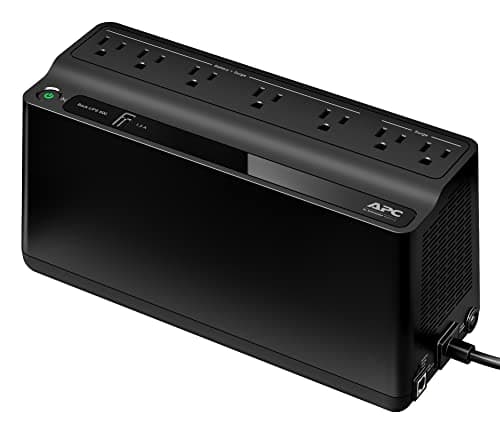
| APC BE600M1 | 600 VA / 330 W | Several hours | About an hour |
|---|
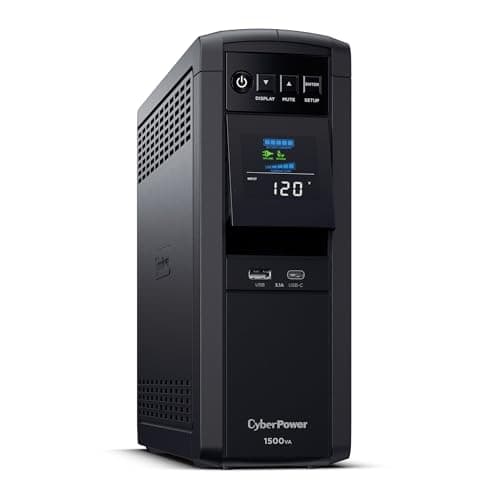
| CyberPower CP1500PFCLCD | 1,500 VA / 1,000 W | Many hours | Several hours |
|---|
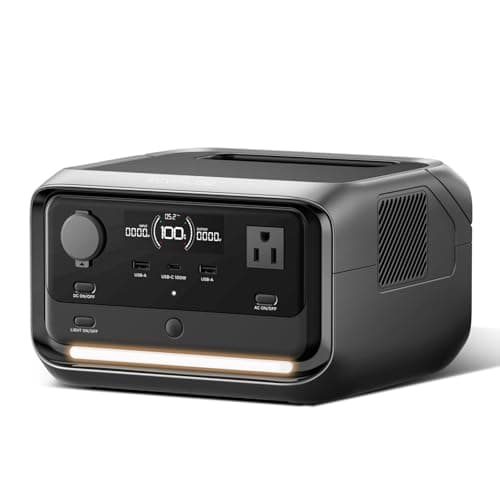
| EcoFlow RIVER 3 Plus | 286 Wh | ~12 h+ | ~4 h |
|---|
| 1,000Wh power station | 1,000 Wh | ~42 h | ~14 h |
|---|
Power station rows computed as capacity × 0.85 ÷ load. UPS rows are given as ranges rather than figures because a UPS's runtime curve at very light loads is non-linear and manufacturers publish only a few points — APC publishes about 23 minutes at 100W for the BE600M1 and CyberPower about 10 minutes at half load for the CP1500PFCLCD. We have not measured either, so we would rather give a band than a false precision.
UPS or power station?
A UPS if the network is genuinely the whole requirement. It is cheaper, it switches over instantly, and it does the job properly. A small UPS is one of the few pieces of equipment in this category that is exactly right for its purpose.
A power station if you want the same protection plus the ability to run other things, or to take it somewhere. Choose one with a published UPS switchover time — the full comparison is here.
Both if you have a home office. A UPS on the network shelf keeps everything online instantly; a station covers the desk, the lights and the rest of the house. If the desktop also needs covering, the battery backup roundup for a PC is the sizing and waveform guide for that half.
The five-minute setup
- Put the modem, the router and any mesh node on battery-backed outlets, not surge-only ones. UPS units have both and they are labeled.
- Leave a lamp on a normal outlet, so you can tell at a glance whether the grid is back.
- Note the manufacture date. A UPS battery lasts 3–5 years and fails silently — a dead UPS behaves exactly like a working one until the power goes.
- Test it: pull the UPS plug from the wall and confirm the internet survives. Do this annually.
- Keep it cool and off the floor. Heat is what kills UPS batteries.
For everything else an outage needs, the full sequence is here, and this page covers what actually happens to your connection during one.