Skip to content
Watt Warden

Power Stations

The Best Power Stations With UPS Function (2026)

Almost every station does pass-through charging. Far fewer switch over fast enough that a desktop does not reboot - and that switchover figure is the whole specification.

By Sawyer V.Updated Published How we work this out
A computer server rack with status lights.

Watt & Warden earns a commission on qualifying purchases made through links on this page, at no extra cost to you. It never changes a ranking, and our picks include products we tell you to skip. Full disclosure.

Quick picks

#ProductBest forPrice
1
No photo

Best capacity behind a UPS function

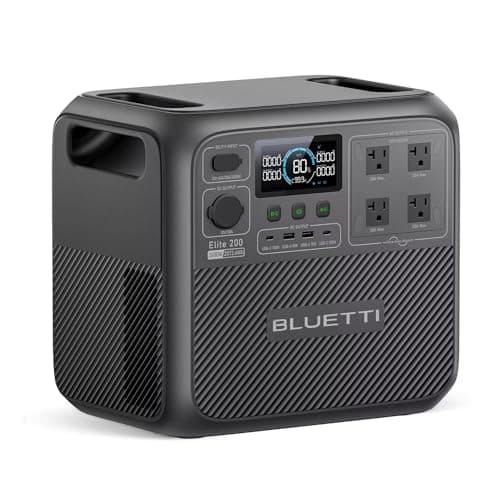
BLUETTI Elite 200 V2

2,073Wh of LiFePO4 with 2,600W output and a ten-year design life.

A desktop plus a fridge, for hours
2
No photo

Best all-round pass-through unit

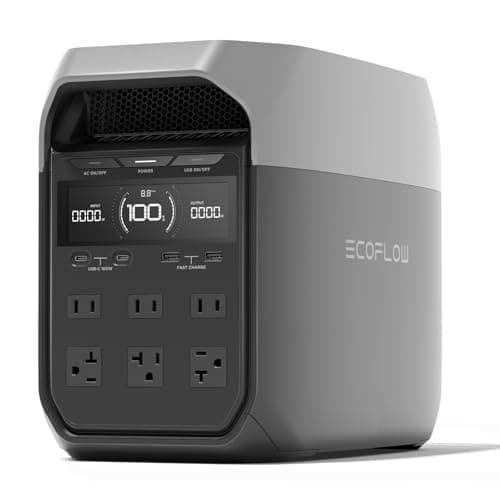
EcoFlow DELTA 2

1,024Wh and 1,800W, with 500W of solar input and expansion to 3kWh.

A desk plus a fridge, expandable
3
No photo

The dedicated UPS that does this better

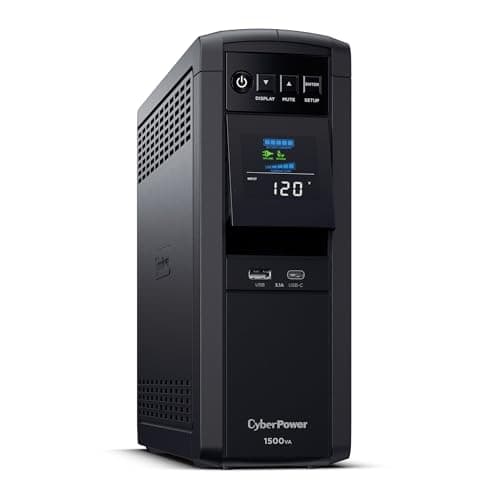
CyberPower CP1500PFCLCD

1,500VA / 1,000W of pure-sine backup with automatic voltage regulation.

A desktop that must never restart
4
No photo

For the network equipment

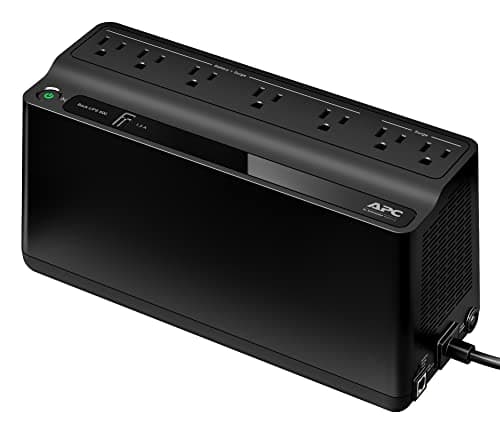
APC Back-UPS BE600M1

600VA / 330W with a published 6-10 ms transfer time and about 23 minutes at 100W.

A router and modem that must not reboot

Prices come from the retailer at page-build time and change constantly. Where no live price is available the button reads “Check price” rather than showing a number we cannot stand behind.

Pass-through and UPS mode are not the same thing

The category uses these interchangeably in marketing and they describe different capabilities.

Pass-through charging means the station can charge from the wall while simultaneously powering devices from its outlets. Nearly every modern unit does this. It says nothing about what happens when the wall supply disappears.

UPS function means that when the input fails, the station takes over the output fast enough that connected equipment never notices. That is a specific, measurable switchover time — and it is what actually matters.

A unit can have excellent pass-through and a switchover slow enough that a desktop reboots every time. Read for the second number, not the first.

How fast is fast enough

EquipmentToleranceConsequence of a slow switchover
LED lampVery highA visible flicker, nothing more
Router and modemModerateReboot, renegotiate, minutes offline
Desktop computerLowHard shutdown, unsaved work, filesystem risk
NAS or serverLowestDropped write, potential array damage
Fridge or freezerVery highNone — the compressor simply restarts
CPAPModerateMachine restarts; the therapy is interrupted, not lost

Tolerance here is a practical characterization rather than a published specification — equipment manufacturers rarely state a ride-through figure. APC publishes 6-10 ms transfer for the BE600M1, which is a useful benchmark for what a purpose-built UPS achieves. Where a station publishes a switchover figure, compare it against that.

The practical reading: if your list is a fridge, lights and chargers, switchover time is irrelevant. If it includes a desktop or a NAS, it is the only specification that matters.

Where a station beats a UPS

  • Duration. Minutes versus hours. A UPS is designed to bridge to a clean shutdown; a station is designed to outlast the outage.
  • It powers everything else too. The same unit runs the fridge, the lights and the phones once the desk is safe.
  • It is portable. A UPS lives behind one desk forever.
  • It recharges from solar. Which turns a fixed capacity into a daily allowance.
  • Battery replacement. Cheap UPS units use sealed lead-acid batteries that need replacing every few years; LiFePO4 stations are rated in thousands of cycles with ten-year design lives.

Where a UPS beats a station

  • Switchover speed. A purpose-built UPS is designed around this single job.
  • Voltage regulation. Automatic voltage regulation corrects sags and surges continuously, not only during an outage. A station generally does not.
  • Cost for the narrow job. A small UPS behind a router costs a fraction of a station.
  • It is always in circuit. No decision to make, nothing to plug in when the forecast turns.
  • Signaling. Many UPS units talk to the computer over USB and can trigger a clean automatic shutdown. Stations do not.

The full comparison goes further on why these are complementary rather than competing.

How to test yours honestly

Manufacturer switchover figures are measured under their own conditions. Your equipment is the real test, and it takes five minutes.

  1. Plug the station into the wall and let it reach a steady state.
  2. Plug the actual equipment into the station. Not a lamp — the desktop, the NAS, the router.
  3. Pull the station's wall plug. Watch what happens to the equipment.
  4. Plug it back in. The return transition can be as disruptive as the loss, and it is rarely tested.
  5. Repeat with everything running that would be running during a real outage. A station under load behaves differently from an idle one.

Do this on an ordinary afternoon. Discovering the switchover is too slow at 3am, with a document open, is the situation the purchase was meant to prevent.

The arrangement that actually works

For a household with a desktop or a NAS, buying one device to do both jobs is usually the wrong call. The better shape is:

  • A small UPS on the network equipment, always in circuit, removing the reboot from every brief flicker.
  • A larger UPS on the desktop if you use one, sized for a clean shutdown rather than a working session.
  • A power station for duration, running the fridge, the lights and — once the outage is confirmed — the desk as well.

That is three purchases where the category sells you one, and it costs less in total than a station large enough to do all three badly. The home office page builds the same argument from the other direction.
The picks in full

01Best capacity behind a UPS function

BLUETTI Elite 200 V2

2,073Wh of LiFePO4 with 2,600W output and a ten-year design life.

The argument for a station over a UPS is duration. A conventional desktop UPS gives you minutes; two kilowatt-hours gives you a working day, and it does the refrigeration as well.

2,600W of continuous output also means the same unit that protects the desk can start a compressor when the outage turns out to be long. A UPS cannot.

Verify the switchover figure in your unit's manual and test it with your actual equipment before relying on it.

Skip it ifyou only need to protect a router. A small dedicated UPS is cheaper and better at that.

Published specifications for the BLUETTI Elite 200 V2
SpecificationPublished figure
Usable capacity2,073.6 Wh
Cell chemistryAutomotive-grade LiFePO4 (LFP)
AC output2,600 W continuous / 3,900 W power lifting
Cycle life6,000+ cycles
Fast charge0–80% in 50 min via dual AC/DC input

Source: BLUETTI — Elite 200 V2 product specifications. These are the manufacturer's published figures, not ours — we have not tested this unit.

02Best all-round pass-through unit

EcoFlow DELTA 2

1,024Wh and 1,800W, with 500W of solar input and expansion to 3kWh.

The pairing that makes sense for most households: enough capacity to outlast a real outage, and a switchover fast enough that ordinary equipment does not notice.

500W of solar input is what makes it a multi-day answer rather than a long-afternoon one.

Skip it ifyour equipment is genuinely intolerant of any interruption. Then buy a dedicated online UPS.

Published specifications for the EcoFlow DELTA 2
SpecificationPublished figure
Usable capacity1,024 Wh (expandable to 3 kWh)
Cell chemistryLiFePO4 (LFP)
AC output1,800 W continuous / 2,700 W surge
X-Boost output2,200 W for resistive loads
Weight27 lb
Cycle life3,000+ cycles
Max solar input500 W
Warranty5 years

Source: EcoFlow — DELTA 2 product specifications. These are the manufacturer's published figures, not ours — we have not tested this unit.

03The dedicated UPS that does this better

CyberPower CP1500PFCLCD

1,500VA / 1,000W of pure-sine backup with automatic voltage regulation.

Named deliberately, because for the narrow job of protecting a desktop through a flicker, a purpose-built UPS is better than a station with a UPS mode. It switches faster, it regulates voltage continuously, and it costs far less.

CyberPower publishes about 10 minutes at half load — a save-and-shut- down window rather than a working session, which is the correct design for the job.

Skip it ifyou want hours rather than minutes. That is a station's job.

Published specifications for the CyberPower CP1500PFCLCD
SpecificationPublished figure
Capacity1,500 VA / 1,000 W
WaveformPure sine wave (PFC compatible)
Outlets12 NEMA 5-15R — 6 battery-backed, 6 surge-only
RegulationAutomatic voltage regulation (AVR)
Run timeabout 10 min at half load, 2.5 min at full load
Warranty3 years including the battery

Source: CyberPower — CP1500PFCLCD product specifications. These are the manufacturer's published figures, not ours — we have not tested this unit.

04For the network equipment

APC Back-UPS BE600M1

600VA / 330W with a published 6-10 ms transfer time and about 23 minutes at 100W.

The published 6-10 ms transfer time is the useful benchmark on this page — that is what a genuine UPS achieves, and it is what a station claiming UPS function should be compared against.

At about 20W, networking equipment runs far longer on this than its 100W rating suggests.

Skip it ifyou already run the router from a station.

Published specifications for the APC Back-UPS BE600M1
SpecificationPublished figure
Capacity600 VA / 330 W
Outlets7 total — 5 battery-backed, 2 surge-only
Run timeabout 23 min at a 100 W load
Transfer time6–10 ms typical
Battery life3–5 years depending on use
ExtrasUSB charging port

Source: APC — Back-UPS BE600M1 product specifications. These are the manufacturer's published figures, not ours — we have not tested this unit.

How these were chosen

We did not test these. Nobody at Watt & Warden has plugged one in. What we did instead: read the manufacturer's published specifications, compile them into a table where the figures line up, and compute the numbers manufacturers leave out — runtime against a real appliance load, and what an hour of running actually costs.

Anything that could not be sourced was left out rather than estimated, and every pick names the buyer who should skip it. The full method is here, including where it is weaker than a publisher with a test bench.

Questions people actually ask

What is UPS function on a power station?

The station takes over the output fast enough when wall power fails that connected equipment never notices. It is different from pass-through charging, which only means the unit can charge and supply simultaneously -- nearly every station does that, and it says nothing about what happens when the input disappears.

Is a power station a good UPS?

For duration, yes -- hours rather than minutes, and it powers the fridge and lights too. For the narrow job of protecting a desktop through a flicker, a purpose-built UPS is better: faster switchover, continuous voltage regulation, USB signaling for automatic shutdown, and far cheaper.

How fast does a UPS switchover need to be?

It depends entirely on what is plugged in. A fridge, lights and chargers do not care at all. A desktop or a NAS does -- APC publishes 6-10 ms transfer for the BE600M1, which is a reasonable benchmark for what a purpose-built UPS achieves and what a station claiming UPS function should be compared against.

How do I test a power station's UPS mode?

Plug the station into the wall, plug the actual equipment into the station, then pull the wall plug and watch. Test the return transition too -- it can be as disruptive as the loss and is rarely checked. Repeat with everything running that would be running in a real outage, because loaded behavior differs.

Should I buy a UPS or a power station?

For a household with a desktop, both. A small UPS on the network equipment always in circuit, a larger one on the desktop sized for a clean shutdown, and a station for duration. That costs less in total than a station large enough to do all three jobs badly.

Sources

Every figure on this page comes from a published source. We have not tested this equipment, so the specifications are the manufacturer's and the statistics are the dataset's — the arithmetic on top of them is ours, and it is shown in full so you can check it. How we work this out.