Skip to content
Watt Warden

Accessories

The Best Smart Plugs and Energy Monitors (2026)

The cheapest backup power purchase you can make is the one that tells you how much backup power you need - because almost everybody guesses high.

By Sawyer V.Updated Published How we work this out
Kasa KP125M Smart Plug

Watt & Warden earns a commission on qualifying purchases made through links on this page, at no extra cost to you. It never changes a ranking, and our picks include products we tell you to skip. Full disclosure.

Quick picks

#ProductBest forPrice
1
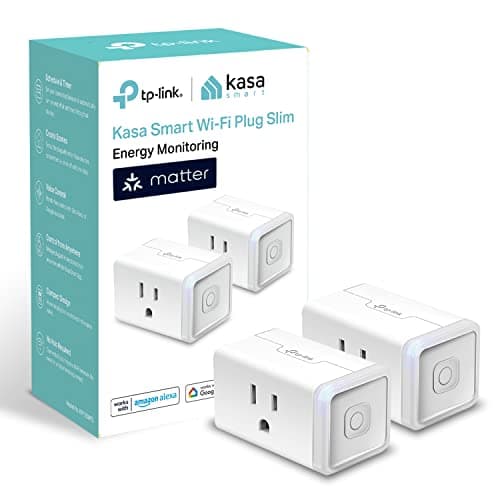
Kasa KP125M Smart Plug

Best overall

Kasa KP125M Smart Plug

15A / 1,800W with real-time and historical logging, Matter support and UL certification.

Measuring one appliance at a time
$29.99 · Check price on Amazon

#ad how this is funded · price as of October 20, 2026

2
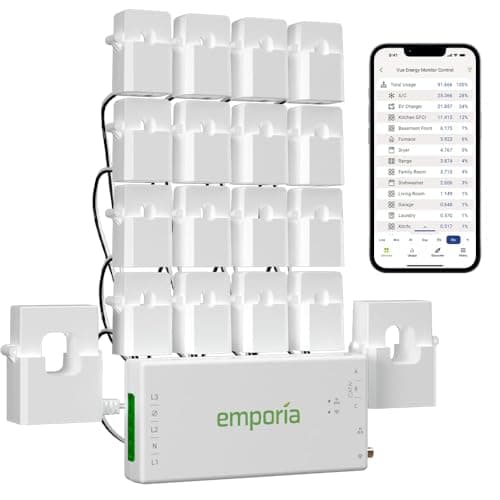
Emporia Vue 3 Energy Monitor

Best for the whole house

Emporia Vue 3 Energy Monitor

Clamp-on sensors for the panel and individual circuits, rated to +/- 2%.

Circuit-level data before sizing a standby generator
$199.99 · Check price on Amazon

#ad how this is funded · price as of October 20, 2026

3
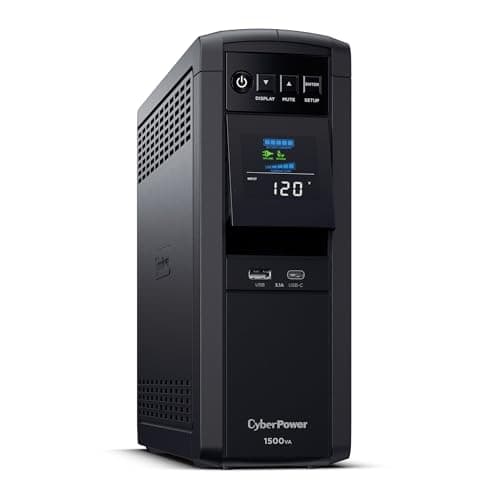
CyberPower CP1500PFCLCD

The meter you may already own

CyberPower CP1500PFCLCD

1,500VA / 1,000W pure sine UPS with an LCD that reports load in watts.

A desk you want to measure and protect at once
$239.95 · Check price on Amazon

#ad how this is funded · price as of October 20, 2026 · $274.95 13% off

4
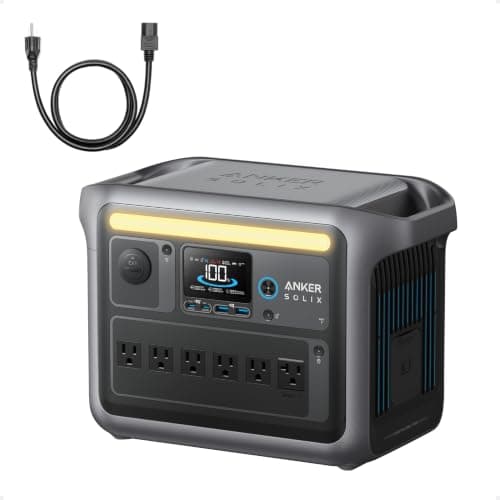
Anker SOLIX C1000

What the measurement is for

Anker SOLIX C1000

1,056Wh with an 1,800W inverter — the band most measured households land in.

The purchase the data should inform
$499.99 · Check price on Amazon

#ad how this is funded · price as of October 20, 2026 · $599.99 17% off

Prices come from the retailer at page-build time and change constantly. Where no live price is available the button reads “Check price” rather than showing a number we cannot stand behind.

Why this is a backup power product

Almost every page on this site eventually says the same thing: read the plate, measure it, do not estimate. That advice is only useful if measuring is easy, and a meter is what makes it easy.

The failure it prevents is specific and expensive. People size backup power from nameplate ratings and worst-case assumptions, and nameplate ratings are ceilings rather than draws. A computer with an 850W power supply may idle at 60W. A refrigerator rated at 800W starting averages 150W. A furnace blower rated 1,600W may draw 700W in practice.

Add those ceilings together and you buy a 7,500W generator for a house that needs 3,000. Measure them and the answer is smaller, cheaper and quieter.

Three tiers of measurement

ToolMeasuresRight for
Basic plug-in watt meterOne 120V appliance, live reading onlyA quick check with no app
Smart plug with energy monitoringOne 120V appliance, with logged historyWorking out averages over days — the useful case
Panel-level monitorWhole service plus individual circuits, including 240VSizing a transfer switch or a standby generator
Clamp meterA live circuit, instantaneouslyAn electrician diagnosing something specific

The middle two are what this page is about. The tier you need follows directly from what you are buying: a battery for some appliances, or a generator and a switch for circuits.

Peak, average and the difference between them

A meter gives you two numbers and they size two different things.

Peak draw sizes the inverter or the generator. It is the largest instantaneous demand, including the surge when a motor starts. Note that many smart plugs sample too slowly to catch a genuine millisecond surge — they will show the running draw well and understate the start.

Average draw sizes the battery. It is what the appliance uses over hours, and for anything that cycles — a refrigerator, a furnace, a well pump — it is dramatically lower than the running figure.

The starting watts page covers why the surge matters and why a meter is not the right tool to measure it. For surge, use the manufacturer's figure or the plate.

The week-long exercise worth running

This is the single most useful thing on the page, and it costs one evening plus a week of waiting.

1. Pick your critical list. Typically the refrigerator, the freezer, the network and lighting. Write it down.

2. Meter the two biggest items for a full week. Refrigerator and freezer are the usual pair, and a week captures the variation between a hot day and a cool one.

3. Read the daily kilowatt-hours, not the watts. That is the number that maps directly onto battery capacity.

4. Add the small stuff from the chart. Lighting and network gear are small enough that the appliance wattage chart is accurate enough.

5. Add 20% and buy against that. The sizing page walks through the arithmetic.

The second job: load shedding during an outage

A smart plug earns its keep twice, and the second use is the one people do not anticipate.

On a generator or a battery you are managing a budget, and the biggest risk is something switching itself on while you are not watching — a second fridge, a dehumidifier, a well pump.

Smart plugs with schedules and auto-off timers let you sequence loads deliberately: the freezer runs for two hours, then the fridge, rather than both compressors starting together and tripping the inverter.

The caveat is significant and worth stating plainly: a Wi-Fi smart plug needs the network, and the network is usually down. This only works if the router is on backup power too — the router page covers that, and the smart home page covers the failure order.

What a meter will not tell you

  • Motor starting surge. Most sample too slowly. Use the plate or the manufacturer's figure.
  • Anything on 240V, unless it is a panel-level monitor. Never put a 120V smart plug near a dryer or water heater circuit.
  • Anything hardwired. The furnace, the well pump and the water heater need a panel monitor or an electrician with a clamp meter.
  • Power factor subtleties. Cheap meters report apparent power rather than real power on some loads, which overstates motors.

The short version

  • Measure before you size. Nameplates are ceilings, not draws.
  • A smart plug for appliances, a panel monitor for circuits.
  • Read daily kilowatt-hours, not instantaneous watts.
  • Use the plate for surge. Meters are too slow to catch it.
The picks in full

01 — Best overall

Kasa KP125M Smart Plug

15A / 1,800W with real-time and historical logging, Matter support and UL certification.

The historical logging is what separates this from a basic plug-in watt meter. A single instantaneous reading tells you the peak you happened to catch; a week of history tells you the average, which is what actually sizes a battery.

1,800W covers every 120V appliance you would reasonably measure — refrigerator, freezer, space heater, microwave, sump pump, computer.

Being a two-pack matters more than it sounds. Measuring the fridge and the freezer at the same time for a week is the exact exercise most people should run.

The honest catch: it needs 2.4 GHz Wi-Fi and the app to log. During the outage you are planning for, it will be offline — read the history afterwards, not during.

Skip it ifthe appliance is hardwired or on a 240V circuit.

Kasa KP125M Smart Plug
$29.99 · Check price on Amazon

#ad how this is funded · price as of October 20, 2026

Published specifications for the Kasa KP125M Smart Plug
SpecificationPublished figure
Rating100-120 V, 15 A, 1,800 W maximum
MonitoringReal-time and historical consumption, per outlet
BillingRate entry for single or time-of-use estimates
ControlSchedules, auto-off timers and presets in the Kasa app
StandardsMatter, 2.4 GHz Wi-Fi, UL certified
VoiceAlexa, Google Assistant and Siri
Size2.6 x 1.5 x 1.6 in

Source: TP-Link — Kasa KP125M product specifications. These are the manufacturer's published figures, not ours — we have not tested this unit.

02 — Best for the whole house

Emporia Vue 3 Energy Monitor

Clamp-on sensors for the panel and individual circuits, rated to +/- 2%.

This is the honest way to answer "what size generator do I need". Clamp-on sensors read the whole service plus individual circuits, which means you can measure the furnace, the well pump and the air conditioner rather than looking up ranges.

The hourly data is retained indefinitely, so a full season of history is available before you take a standby quote — which is exactly when you want it.

It also reads 240V circuits, which no smart plug does.

The honest catch: installation means working inside a live electrical panel. That is an electrician's job unless you genuinely know what you are doing, and the cost of that call-out belongs in the comparison.

Skip it ifyou only want to know what one appliance does. That is a plug, not a panel.

Emporia Vue 3 Energy Monitor
$199.99 · Check price on Amazon

#ad how this is funded · price as of October 20, 2026

Published specifications for the Emporia Vue 3 Energy Monitor
SpecificationPublished figure
CoverageWhole panel plus individual circuits via clamp-on sensors
CompatibilitySingle phase, single-split phase and 2-wire systems
AccuracySensors rated to +/- 2%
Resolution1-second data live in the app; 1-minute kept 7 days; hourly kept indefinitely
SolarSolar and net metering supported
Connection2.4 GHz Wi-Fi with an internet connection
CertificationUL certified

Source: Emporia — Vue 3 home energy monitor listing. These are the manufacturer's published figures, not ours — we have not tested this unit.

03 — The meter you may already own

CyberPower CP1500PFCLCD

1,500VA / 1,000W pure sine UPS with an LCD that reports load in watts.

Worth knowing before buying anything: most decent UPS units report connected load in watts on their display. If you already have one, you already have a meter for whatever is plugged into it.

For a desk, that is the measurement and the protection in one purchase.

The honest catch: it only measures what is plugged into it, and it does not log history.

Skip it ifyou do not need battery backup as well.

CyberPower CP1500PFCLCD
$239.95 · Check price on Amazon

#ad how this is funded · price as of October 20, 2026 · $274.95 13% off

Published specifications for the CyberPower CP1500PFCLCD
SpecificationPublished figure
Capacity1,500 VA / 1,000 W
WaveformPure sine wave (PFC compatible)
Outlets12 NEMA 5-15R — 6 battery-backed, 6 surge-only
RegulationAutomatic voltage regulation (AVR)
Run timeabout 10 min at half load, 2.5 min at full load
Warranty3 years including the battery

Source: CyberPower — CP1500PFCLCD product specifications. These are the manufacturer's published figures, not ours — we have not tested this unit.

04 — What the measurement is for

Anker SOLIX C1000

1,056Wh with an 1,800W inverter — the band most measured households land in.

Included to close the loop. The commonest outcome of actually measuring a household critical-load list is that it comes in lower than expected, and the kilowatt-hour band turns out to be enough.

Buying this instead of a 3,000Wh unit on a guess is a large saving that a meter pays for many times over.

The honest catch: measurement can also tell you that you need more than you hoped. That is still worth knowing before you buy rather than after.

Skip it ifyour measured load says otherwise. That is rather the point.

Anker SOLIX C1000
$499.99 · Check price on Amazon

#ad how this is funded · price as of October 20, 2026 · $599.99 17% off

Published specifications for the Anker SOLIX C1000
SpecificationPublished figure
Usable capacity1,056 Wh
Cell chemistryLiFePO4 (LFP)
AC output1,800 W continuous / 2,400 W SurgePad
Cycle life3,000 cycles
Wall recharge80% in 43 min, full in 58 min
Max solar input600 W (full solar recharge ~1.8 h)
Ports11 total, including 6 AC on panel-equipped bundles

Source: Anker — SOLIX C1000 product specifications. These are the manufacturer's published figures, not ours — we have not tested this unit.

How these were chosen

We did not test these. Nobody at Watt & Warden has plugged one in. What we did instead: read the manufacturer's published specifications, compile them into a table where the figures line up, and compute the numbers manufacturers leave out — runtime against a real appliance load, and what an hour of running actually costs.

Anything that could not be sourced was left out rather than estimated, and every pick names the buyer who should skip it. The full method is here, including where it is weaker than a publisher with a test bench.

Questions people actually ask

Why would I buy an energy monitor for backup power?

Because nameplate ratings are ceilings rather than draws, and sizing from them makes people buy two or three times the generator they need. A computer with an 850W supply may idle at 60W; a refrigerator rated 800W starting averages 150W. A meter costs a fraction of the over-purchase it prevents.

Smart plug or whole-house energy monitor?

A smart plug for individual 120V appliances -- fridge, freezer, space heater, computer -- with logged history so you can read averages rather than a single reading. A panel-level monitor when you are sizing a transfer switch or a standby generator, because it reads circuits including 240V ones that no plug can reach.

Will a smart plug measure my refrigerator's starting surge?

Probably not. Most sample too slowly to catch a genuine millisecond surge, so they show the running draw well and understate the start. Use the plate or the manufacturer's figure for surge, and use the meter for the running and average numbers -- which is what it is genuinely good at.

Can I use smart plugs to manage loads during an outage?

Yes, with one large caveat: a Wi-Fi smart plug needs the network, and the network is usually down. It only works if the router is on backup power too. Given that, schedules and auto-off timers let you sequence the freezer and the fridge rather than having both compressors start together and trip the inverter.

How do I work out what size backup power I need?

Meter your two biggest critical loads -- usually the refrigerator and freezer -- for a full week so you capture hot and cool days. Read the daily kilowatt-hours rather than the watts, add the small items from a wattage chart, add about 20% margin, and buy against that total.

Sources

Every figure on this page comes from a published source. We have not tested this equipment, so the specifications are the manufacturer's and the statistics are the dataset's — the arithmetic on top of them is ours, and it is shown in full so you can check it. How we work this out.